
AI-DLC RACI & Governance Gate Design Template
Every AI output gets a human gate, or gates quietly evaporate under delivery pressure. Which failure mode is your team defaulting to?
An Excel implementation kit (v1.0) for CIOs, Programme Managers, and governance design teams making explicit, activity by activity, who is accountable for approval and how rigorous that approval needs to be. It produces two linked artefacts in a single workbook: a RACI matrix covering every Inception, Construction, and Operations activity, and a Governance Gate Design that classifies each activity as a Hard Gate, Soft Gate, or Autonomous action — directly operationalising AI-DLC's adaptive-workflow-depth principle so ceremony is matched to actual risk. Includes a full .docx User Guide. No macros, nothing scored 1–5 — a structured design instrument with built-in validation.
Delivered as an Excel workbook with a full User Guide. Download immediately after purchase.
$39 USD · one-time
■ Instant download · ■ No macros · ■ Excel 2016+
The AI-DLC RACI & Governance Gate Design Template is an Excel implementation kit that makes explicit, activity by activity, who is accountable for approving AI-DLC work and how rigorous that approval needs to be. It produces a RACI matrix (R/A/C/I) for twelve pre-seeded Inception, Construction, and Operations activities, enforced by an automated exactly-one-Accountable rule, alongside a Governance Gate Design that classifies each activity as a Hard Gate (mandatory synchronous approval), Soft Gate (asynchronous review with a timeout), or Autonomous (logged only) — catching both over-ceremony and under-governance automatically.
A validated design, not just a filled-in template.
Every activity checked for exactly one accountable owner, gate ceremony checked against a recommended ceiling, and under-governance flagged automatically — before anyone signs off. Shown below with illustrative sample figures.
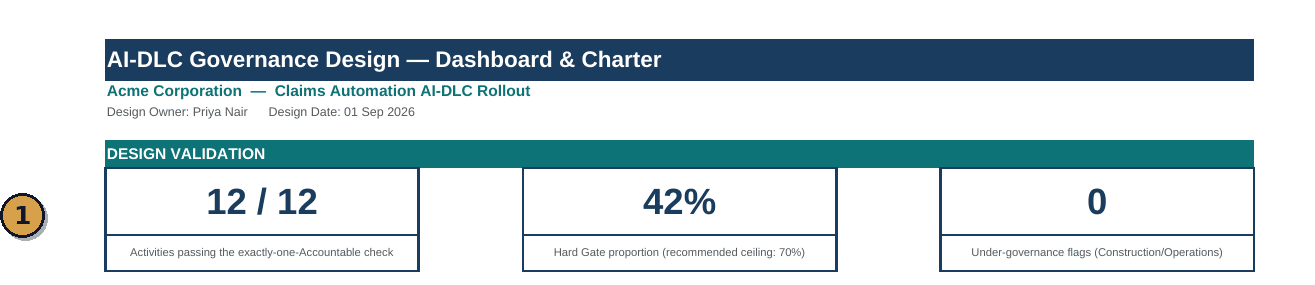
Three built-in checks run on your design as you complete it — accountability completeness, hard-gate proportion against a recommended ceiling, and under-governance flags — so a flawed RACI gets caught before it ships, not after.
Undefined gate ownership defaults to one of two failure modes.
AI-DLC's central discipline — the Plan-Execute cycle in which AI proposes and a human validates — only functions if an organisation has decided, activity by activity, who is accountable for approval and how rigorous that approval needs to be. Left undefined, delivery teams default to over-governance or under-governance, and both are expensive in different ways.
The template exists to make the accountability and gate-rigour decision explicit, defensible, and durable — classified by blast radius and reversibility, not by how the work happened to be authored.
Two linked artefacts. One enforced rule. Three gate types.
The RACI Matrix assigns R/A/C/I per activity per role, with an automated exactly-one-Accountable check. The Governance Gate Design tab then classifies each of the same activities into a Hard Gate, Soft Gate, or Autonomous action — and the Dashboard catches both over-ceremony and under-governance automatically.
RACI Conventions · the Exactly-One-Accountable RuleR Responsible — performs the activity or review; more than one role may hold this. A Accountable — owns the outcome and holds final sign-off; exactly one role per activity, a hard rule the workbook enforces automatically. C Consulted — provides input before the decision, two-way communication sought in advance. I Informed — notified after the decision, one-way communication after the fact. Every row carries two automated checks: Accountable Check flags red on zero or multiple Accountable roles; Responsible Check flags amber if no role performs the work at all.
The Three Gate Types · Classified by Blast Radius and Reversibility- Exactly-One-Accountable Rule
- A hard rule enforced automatically on every RACI Matrix row: exactly one Accountable role per activity, no more and no fewer — the workbook flags any row falling out of compliance.
- Governance Gate Design
- The classification of each activity as a Hard Gate, Soft Gate, or Autonomous action, based on blast radius and reversibility rather than how the work was authored, directly operationalising AI-DLC's adaptive-workflow-depth principle.
Every tab, explained.
One Microsoft Excel workbook (.xlsx) containing five tabs.
Production Deployment Approval, end to end.
How the RACI Matrix and Governance Gate Design interact on the OP-2 activity, as pre-seeded in the workbook.
| Tab | What Happens |
|---|---|
| RACI Matrix | DevOps / SRE is Accountable; Engineering Lead / Architect and Security / Compliance Reviewer are Consulted; Product Owner and Executive Sponsor are Informed. Accountable Check returns OK. |
| Governance Gate Design | Rated High criticality, classified Hard Gate. Rationale records production deployment as the highest blast-radius, lowest-reversibility action in the lifecycle — mandatory synchronous approval applies regardless of how the change was authored. |
| Dashboard | Contributes to the Hard Gate proportion tile. Correctly classified as a gate, not Autonomous, at High criticality — does not trigger an under-governance flag. |
This is the level of specificity every row should reach: a single named Accountable role, a criticality rating reflecting genuine blast radius, and an escalation path a new team member could follow without asking for clarification.
Built for the governance design session, not one person’s judgement call.
Own convening the governance design session and adopting the resulting Governance Charter formally, not distributing it passively.
Bring domain judgement to Criticality ratings and Gate Type classification for Construction-phase activities they own.
Confirm Accountable assignments and escalation paths for the Operations-phase activities and quality gates they are accountable for.
Facilitate the governance design session for a client and use the workbook as the durable artefact of what was agreed.
Upstream of this: the AI-DLC Pilot Selection & Portfolio Segmentation Tool introduces the Criticality Tier concept this template's Gate Design tab draws on for Tier 1 systems. (Placeholder link — product not yet published.)
Paired operate instrument: the AI-DLC Governance & Metrics Dashboard tracks Mob ritual attendance and Human Validation Gate pass rate operationally once this template's gate design is live.
View Governance & Metrics Dashboard →Assesses whether it's honoured: the AI-DLC Maturity Model & Benchmarking Tool assesses, on a recurring cadence, whether the gate discipline documented here is actually being honoured in practice.
View Maturity Model & Benchmarking →Shares its role list: the AI-DLC Role Transition & Org Design Guide uses the identical eight-role default list found on this template's Settings tab — keep both synchronised if you customise it. (Placeholder link — product not yet published.)
What makes this a design instrument, not a template to fill in once.
What this template is not.
Positioned in the Viksya AI-DLC line as an Implementation Kit, not a scored assessment.
What you need to run it.
Questions buyers ask before their first design session.
What is the exactly-one-Accountable rule, and why is it enforced?
Every activity must have exactly one Accountable role — zero means nobody owns the outcome, and more than one means accountability is diffused and, in practice, owned by no one when it matters. The workbook checks this automatically on every row so a design is never circulated with a silent gap.
How do I choose between Hard Gate, Soft Gate, and Autonomous?
By blast radius and reversibility, not by how the work was authored. Reserve Hard Gates for expensive or slow-to-unwind mistakes, Soft Gates for short-horizon activities protected by downstream controls, and Autonomous for low-risk, easily reversible actions where the audit log provides sufficient oversight.
What happens if Hard Gates exceed 70% of activities?
The Dashboard flags this as over-ceremony — a signal the design has defaulted to gating everything, which undermines the velocity case for AI-DLC. Review whether some of those gates could safely become Soft Gates or Autonomous actions instead.
Can I add activities beyond the twelve pre-seeded ones?
Yes. The twelve pre-seeded activities are a defensible starting point, not a fixed list. Extend the RACI Matrix and Governance Gate Design tabs together, keeping every new activity's Accountable Check and Gate Type classification consistent with the existing design logic.
How is the Governance Charter meant to be used?
Export it to PDF from the Dashboard/Summary tab's pre-set print area and circulate it to the full team as the single source of truth for who signs off on what. It should be formally adopted through a session with every role represented, then re-adopted whenever team composition changes materially or a gate is bypassed under delivery pressure.
Is a User Guide included?
Yes. A fully formatted .docx User Guide is included in the download. It covers RACI conventions, the three gate types, a full worked example, adopting the Governance Charter, and maintenance and versioning guidance.
Decide who's accountable before delivery pressure decides it for you.
Download, complete Settings, and run your first governance design session within the week.
■ Instant download · ■ No subscription · ■ Implementation kit — not a scored assessment