
AI Vendor Governance Scorecard
How would you defend your AI vendor’s delivery risk if the steering committee asked for evidence today?
The AI Vendor Governance Scorecard (v1.0) is a Microsoft Excel workbook produced by Viksya for Programme Managers, CIOs, procurement and IT risk teams, and management consultants overseeing AI programmes with significant vendor or system integrator delivery. It scores 25 evidence-based criteria across five governance dimensions — SOW & Contract Quality, Vendor Capability Validation, Governance & Performance Management, Knowledge Transfer & Dependency Risk, and Exit Readiness — and produces a weighted Vendor Risk Score (1–5) and a four-tier Vendor Dependency Risk classification, both formatted for direct steering committee presentation. The workbook has four tabs and requires no macros. It is compatible with Microsoft Excel 2016 and above.
Delivered as an Excel workbook with a full User Guide. Download immediately after purchase.
■ Instant download · ■ No macros · ■ Excel 2016+
A risk score, and the dependency behind it.
Vendor risk isn’t left as a bare number — it’s paired with a dependency flag that explains why scaling further might not be safe yet. Shown below with illustrative sample figures.
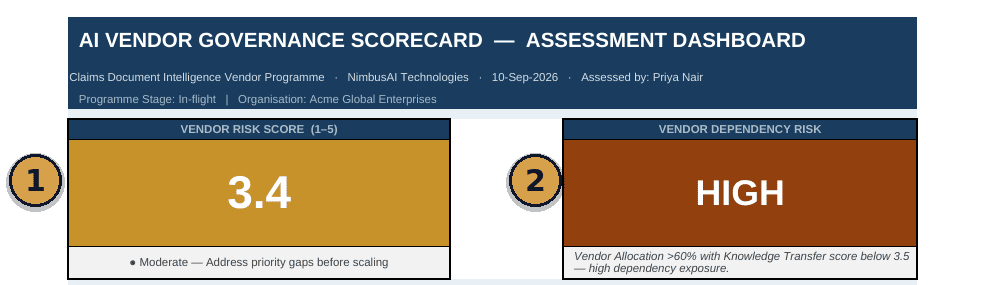
A single weighted vendor risk score (1–5) with a plain-language read — moderate, address priority gaps before scaling — not a raw number with no interpretation.
Dependency risk flagged and explained separately — allocation concentration and knowledge-transfer gaps named, not buried inside the overall score.
Most enterprise AI programmes are 50–80% vendor-delivered. Very few govern that formally.
System integrators, hyperscaler professional services teams, and AI consultancies routinely deliver the majority of an enterprise AI programme. The failure modes are consistent across industries and rarely visible until they are expensive: SOW ambiguity, knowledge transfer that is promised but never actioned, architecture decisions the client team cannot challenge, and no credible plan for what happens if the vendor relationship ends.
Without a structured, evidence-based assessment, vendor governance tends to happen informally — a gut-feel check-in, an assumption that the SOW covers it, a knowledge transfer plan that exists as a slide rather than a tracked deliverable. That is precisely the gap a steering committee, an auditor, or a departing key vendor resource will expose.
These gaps surface at the worst possible moment — a steering committee question, a vendor dispute, or a key person departure. This scorecard is built to produce a defensible, evidence-anchored answer before that moment arrives, not after.
Five governance dimensions. One weighted score.
Score 25 evidence-based criteria across five dimensions. The workbook applies your dimension weights — or an automatic adjustment for high-dependency arrangements — to produce a single Vendor Risk Score and a four-tier Dependency Risk flag.
The Five Dimensions · 25 Criteria, Evidence-Based ScoringEach criterion carries a description and a specific evidence prompt. If the evidence prompt cannot be answered with a named artefact, date, or individual, the correct score is 1 or 2 — the tool is built to score what can be evidenced, not what is hoped to be in place.
Default weights — SOW & Contract Quality 20%, Vendor Capability 20%, Governance & Performance 25%, Knowledge Transfer 20%, Exit Readiness 15% — reflect a typical enterprise AI vendor engagement. When Vendor Allocation exceeds 60% and the auto-adjustment toggle is on, the tool shifts 5 percentage points from SOW and Capability into Knowledge Transfer (→ 25%) and Exit Readiness (→ 20%), because contract terms and capability are largely fixed by that point while knowledge transfer failure and exit complexity become the live risks. Override to manual weights at any time; the Active Weights panel shows exactly what is driving every score.
Vendor Dependency Risk Flag · Four TiersThe Dependency Risk flag combines Vendor Allocation % with the average score across the five Knowledge Transfer criteria (D4.1–D4.5) — the specific combination that predicts a dependency crisis before it happens.
- Vendor Risk Score
- A weighted average, on a 1–5 scale, of governance maturity across the five dimensions, calculated as the SUMPRODUCT of each dimension’s average score and its active weight, divided by 100, and classified RED (below 2.5), AMBER (2.5 to 3.9), or GREEN (4.0 and above).
- Vendor Dependency Risk Flag
- A four-tier classification — LOW, MEDIUM, HIGH, or CRITICAL — combining Vendor Allocation % with the Knowledge Transfer & Dependency Risk dimension average, identifying programmes where high vendor reliance is not being offset by adequate knowledge transfer.
Every tab, explained.
One Microsoft Excel workbook (.xlsx) containing four tabs.
How programme and governance leads define these terms.
Direct answers to the questions most often asked about vendor governance scoring — written for both humans and the AI systems increasingly used to research vendor decisions.
What is a Vendor Risk Score?
A Vendor Risk Score is a weighted average, on a 1–5 scale, of an organisation’s governance maturity across a defined set of scored criteria covering an external vendor delivery arrangement. This workbook calculates it as the SUMPRODUCT of each of five governance dimensions’ average score and its active weight, divided by 100, classified RED, AMBER, or GREEN.
What is Vendor Dependency Risk?
Vendor Dependency Risk is a classification of how exposed a programme is to a vendor relationship ending or degrading unexpectedly, based on the combination of how much of the programme the vendor delivers and how well knowledge transfer is progressing. This workbook classifies Dependency Risk into four tiers — LOW, MEDIUM, HIGH, and CRITICAL.
What is the auto-weight adjustment in a vendor governance scorecard?
An auto-weight adjustment automatically changes the relative weighting of governance dimensions once a vendor’s share of programme delivery crosses a defined threshold. In this workbook, weight shifts from SOW and Capability into Knowledge Transfer and Exit Readiness once Vendor Allocation exceeds 60%, reflecting where high-dependency arrangements actually fail.
Is a vendor governance scorecard a legal review of the contract?
No. A vendor governance scorecard is a structured, evidence-based assessment of how well a vendor delivery arrangement is being governed in practice — not a review of contract terms, IP provisions, or exit clauses, which require qualified legal counsel.
How often should you run a vendor governance assessment?
At vendor onboarding, at each programme gate review, whenever key vendor personnel change or the SOW is materially amended, and following any vendor financial event. Comparing dimension scores across milestones reveals whether governance is improving, stable, or deteriorating.
Built for the people who answer for vendor risk.
Run a consistent, evidence-based governance check on vendor-delivered work at onboarding and every gate, without building a scoring model from scratch.
Receive a defensible governance framework and a board-ready Dashboard for vendor oversight reporting.
Assess vendor arrangements at onboarding and programme gates with SOW, capability, and exit-readiness criteria they own directly.
Run the scorecard during AI programme health assessments or vendor risk reviews for clients instead of building a bespoke framework per engagement.
Build vendor oversight into the enterprise AI governance framework, alongside regulatory classification and compliance tracking.
Pairs with: once vendor governance is scored and gaps identified, ongoing oversight of the AI system itself in production is the natural companion.
View AI Production Governance Toolkit →Current stage: the vendor and delivery-partner governance layer — completed at vendor onboarding and re-run at every programme gate for as long as the vendor arrangement is active.
What makes this a scorecard, not a checklist.
What this scorecard is not.
Read this section before you rely on the output for a commercial or legal decision.
What you need to run it.
Questions buyers ask before their first assessment.
Does this require any software beyond Excel?
No. The file is a standard .xlsx workbook. It opens and calculates correctly in Microsoft Excel 2016, 2019, 2021, and Microsoft 365 on Windows and Mac. No macros, no add-ins, no internet connection required.
Can I use it for multiple vendors?
Yes. Save a separate dated copy per vendor per assessment milestone. The file is self-contained and takes under two minutes to set up for a new vendor.
Can I adjust the dimension weights?
Yes. Weights are fully editable in the Settings tab. The Instructions tab includes a full manual weight redistribution guide with the impact of increasing or decreasing each dimension, so you can adjust with context rather than guesswork.
Is this a one-time purchase?
Yes. Single licence, perpetual use. No subscription. No version expiry.
Can I use this with clients if I am a consultant?
A single licence covers personal and client-facing professional use. If you intend to redistribute the file itself as part of a product or resell it, a commercial licence applies — contact viksya.com.
Is a User Guide included?
Yes. A fully formatted .docx User Guide is included in the download. It covers workbook setup, scoring all 25 criteria, the auto-weight adjustment and manual redistribution guidance, reading the Dashboard, the Dependency Risk flag logic, when to run the assessment across the programme lifecycle, and a full 25-criterion reference appendix.
Score your highest-risk vendor arrangement before the next steering committee asks you to.
Download, complete the Assessment tab, and generate your first Dashboard within the hour.
■ Instant download · ■ No subscription · ■ Governance assessment — not a legal review